Best LED Strip Lights 2026: 5 Smart Picks Compared
An LED strip behind a desk, TV or shelf is one of the cheapest ways to change how a room feels. The hard part is not the colors — every strip does millions — but brightness, visible dots, adhesive that lets go, and whether it works with the smart-home system you already have.
Quick answer
For most rooms, the Govee Strip Light 2 Pro is the best all-rounder: 60 LEDs per meter, a rated 340 lumens per meter, multi-color RGBIC effects and Matter support at a mid-range price. If you already use Philips Hue, the Hue Lightstrip Plus V4 has the best white light and ecosystem. For a smooth, dot-free line on a visible edge, choose the Govee COB Strip Light Pro; for a TV that lights up to match the picture, the Govee Envisual TV Backlight T2; and to spend as little as possible, the Bluetooth-only Govee RGBIC LED Strip Light.
We did not run in-house tests on any of these strips. A fair test would need light-meter readings at a fixed distance and months of installation to judge adhesive and app reliability, and we have done neither. Instead, we took LED density, rated brightness, connectivity and length options from the manufacturers' product pages, checked current prices at major US retailers, and read a large volume of buyer reviews, keeping only complaints that repeat across many owners — adhesive failure, app or Wi-Fi pairing problems, visible dots, color mismatch between segments — rather than one-off impressions. Brightness figures are manufacturer ratings and are measured differently by each brand, which we point out where it matters.

🏆 Best overall: The Strip Light 2 Pro is our pick because it balances brightness, effects and smart-home support at a reasonable price. Govee lists 60 LEDs per meter and a rated 340 lumens per meter, RGBIC segments for multi-color effects, Wi-Fi and Bluetooth control, and Matter support, with lengths up to 10 meters.
Top picks ↓| Product | Price | Link |
|---|---|---|
| $50〜$120Reference price | ||
| $90〜$110Reference price | ||
| $100〜$150Reference price | ||
| $140〜$170Reference price | ||
| $20〜$70Reference price |
Top picks
Related articles

Sold in several lengths up to 10 meters; check the length before buying.
The Strip Light 2 Pro is our pick because it balances brightness, effects and smart-home support at a reasonable price. Govee lists 60 LEDs per meter and a rated 340 lumens per meter, RGBIC segments for multi-color effects, Wi-Fi and Bluetooth control, and Matter support, with lengths up to 10 meters. It suits desks, bedrooms and TV walls where the strip is mostly hidden. Common complaints are visible dots when the strip is in direct view, adhesive that lets go on textured or painted walls, and occasional Wi-Fi pairing trouble during setup.
Pros
- ✓Rated 340 lumens per meter, bright for its class
- ✓Matter support for Apple Home, Google and Alexa
- ✓RGBIC multi-color effects and long lengths
Cons
- ✗Individual dots visible in direct view
- ✗Adhesive can struggle on textured walls
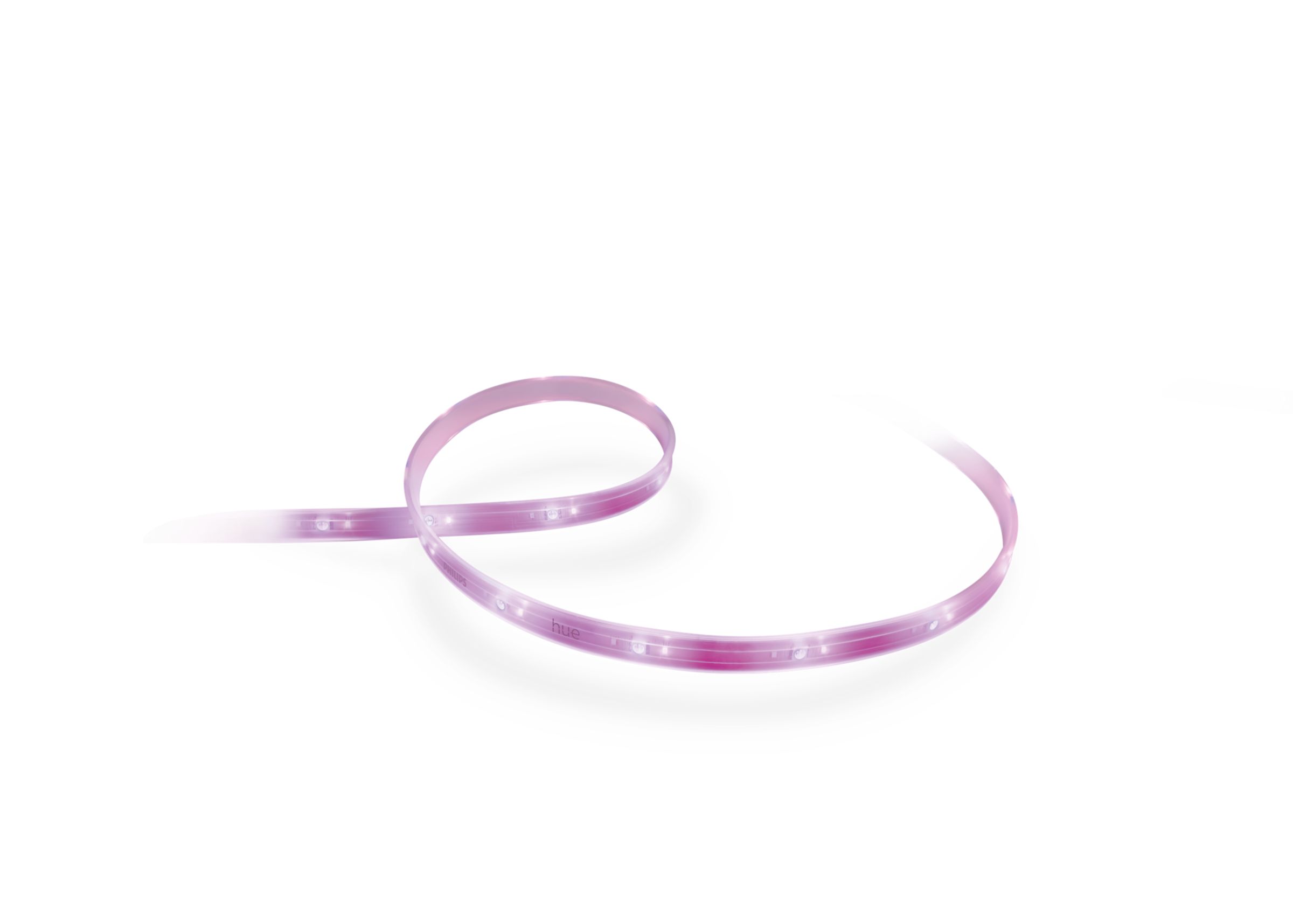
The 2-meter base kit includes the power supply; extensions are sold separately.
The Lightstrip Plus V4 is the choice when white light quality and ecosystem matter more than effects. The 2-meter base strip can be extended up to 10 meters, shows 16 million colors and tunable white from 2000K to 6500K, and is rated at up to 1,700 lumens. It works over Bluetooth on its own or joins Hue rooms, scenes and automations through the Hue Bridge. It suits homes already using Hue bulbs. Owners mention the high price per meter, that it shows one color at a time rather than multi-color effects, and that cut-off pieces cannot simply be reused.
Pros
- ✓Excellent tunable white from 2000K to 6500K
- ✓Joins Hue scenes and automations via the Bridge
- ✓Extendable from 2 to 10 meters
Cons
- ✗High price per meter
- ✗One color at a time, no multi-color effects

Sold in several lengths; confirm it is the COB Pro model.
The COB Strip Light Pro solves the biggest visual problem with LED strips: visible dots. Govee rates it at 1,260 LEDs per meter packed into a continuous chip-on-board line, so it looks like a smooth band of light even on a visible edge such as a shelf, cabinet or desk. It keeps app control and RGBIC segment effects. It suits places where the strip itself is in view. Buyers mention the higher price than standard strips and that, like any strip, it needs a clean, smooth surface for the adhesive to hold.
Pros
- ✓Continuous, dot-free line of light
- ✓Rated 1,260 LEDs per meter
- ✓RGBIC segment effects with app control
Cons
- ✗Costs more than standard strips
- ✗Needs a clean, smooth surface to stick well
Subscribe to our newsletter
Occasional updates and new releases — no spam.

Choose the kit for 55–65-inch or 75–85-inch TVs.
The Envisual TV Backlight T2 is built for one job: making the wall behind a TV glow in colors that follow the picture. A dual-lens camera mounted on the TV reads the screen and the strip behind it changes color to match, which works with any source because it watches the screen itself. Versions are sold for 55–65-inch and 75–85-inch TVs, so buy the size that matches yours. It suits movie and game rooms. Owners mention that the camera must be carefully positioned and calibrated, and that color matching lags slightly behind fast scenes.
Pros
- ✓Colors follow the picture on screen
- ✓Works with any source via the camera
- ✓Sized kits for 55–65 and 75–85-inch TVs
Cons
- ✗Camera placement and calibration take care
- ✗Slight lag on fast-changing scenes

Several roll lengths are sold; confirm it is the Bluetooth RGBIC version.
This Bluetooth Govee RGBIC strip is the cheapest way to add multi-color accent lighting. It has an inline button controller for quick on/off and color changes, app control over Bluetooth, and is sold in long rolls at a low price per meter. It suits bedrooms, gaming corners and first-time buyers. The trade-offs are Bluetooth-only control, so no remote access or voice assistants, lower brightness than the Pro models, and the same adhesive complaints as other strips on rough surfaces.
Pros
- ✓Very low price per meter
- ✓Inline button controller, no phone needed
- ✓RGBIC multi-color effects
Cons
- ✗Bluetooth only, no remote or voice control
- ✗Dimmer than the Pro models
Brightness and LED density: what the numbers mean
Two numbers decide how a strip looks: lumens per meter and LEDs per meter. Lumens tell you whether the strip can work as real indirect lighting or only as a colored glow; around 300 lumens per meter or more is enough to light a wall behind a TV or a shelf in the evening. LED density decides how smooth the line looks: the Govee Strip Light 2 Pro has 60 LEDs per meter, while the Govee COB Strip Light Pro packs a rated 1,260 per meter into a continuous line.
Colored light always looks dimmer than white, and deep blues and reds are the dimmest of all. If you want the strip to replace a lamp, look at how good its white is, not just how many colors it can show. The Philips Hue Lightstrip Plus V4 is the strongest here, with tunable white from 2000K to 6500K.
Smart control: Wi-Fi, Bluetooth, Matter and ecosystems
Bluetooth-only strips are cheaper and work from your phone in the same room, but you cannot control them away from home and they usually do not work with voice assistants. Wi-Fi strips such as the Govee Strip Light 2 Pro add schedules, remote control and Alexa or Google Assistant. Matter support means the strip can be added to Apple Home, Google Home, Alexa and SmartThings without depending on one brand's app.
If you already own Philips Hue bulbs, a Hue strip joins the same rooms, scenes and schedules through the Hue Bridge, which is the main reason to pay more for it. If you have no system yet, Govee's app is the simplest way to start, and its music and scene effects are more elaborate than Hue's.
Installation: adhesive, corners, cutting and power
Measure the run before buying and plan where the power adapter will sit, because the powered end must be near an outlet. Clean the surface with isopropyl alcohol and let it dry before sticking the strip on; most adhesive failures in reviews happen on dusty, textured or painted surfaces, or behind hot TVs. Mounting clips or aluminum channels are a cheap fix when the tape alone will not hold.
Most strips can be cut at marked points to shorten them, but pieces cut off are usually not reusable without extra connectors, and sharp 90-degree bends can damage the circuit. Buy slightly longer than you need and cut once, or choose a model sold in the exact length you want.
Common mistakes: visible dots, wrong placement and color mismatch
The most common disappointment is seeing individual dots of light when the strip is in view, such as on the edge of a shelf or under a cabinet. Point the strip at the wall so you only see the reflection, use a diffuser channel, or choose a COB strip, which is designed to look like a continuous line.
Two other complaints repeat across brands. Colors can vary slightly between separate strips or segments, so keep one room on one model. And a strip mounted too close to the wall creates a harsh hotspot instead of an even glow; a few centimeters of distance or angling the strip away usually looks better.
Frequently asked questions
What is the difference between RGB and RGBIC strips?▼
Can I cut an LED strip and reconnect the pieces?▼
Are LED strips bright enough to replace a room light?▼
Is it safe to leave LED strips on for a long time?▼
Prices change. Check the retailer for the current price.
Comments & questions
Discussion happens on nattzy, our community forum. Sign in with Google to post — it takes a second.
Still deciding? Ask the community your own question — Post a question on nattzy ↗
Related articles
Best Noise Cancelling Headphones 2026: 5 Flagships
Best Smart Watch 2026: 5 Fitness & Lifestyle Watches
Best Air Purifier 2026: 5 models compared honestly
Best Robot Vacuums 2026: 5 Models Compared Honestly
Best Hair Dryers 2026: 5 high-end models compared honestly
Food
Best Rice Cookers 2026: 5 Top Models Compared
Best Rice Cookers 2026: 5 Top Models Compared