Best Computer Speakers 2026: 5 Desktop Picks Compared
Laptop and monitor speakers are the weakest part of most desks. A modest pair of powered speakers fixes that for less than a mid-range keyboard, as long as you buy the right size and the right inputs.
Quick answer
The Edifier R1280DBs is the computer speaker to buy for most desks: 4-inch woofers, 42W of amplification and every common input including optical, Bluetooth and two RCA pairs, for well under $200. The Kanto ORA is the premium compact pick with USB-C audio, the Creative Pebble V3 is the best cheap upgrade over built-in speakers, the Edifier MR4 suits anyone who edits audio or wants a flatter sound, and the Logitech Z407 is the one to get if you want real bass from a subwoofer for games and films.
We did not run our own testing on any of these speakers. Doing it properly would mean measuring frequency response in the same room with a calibrated microphone and comparing them side by side at matched volume, which we did not do. Instead, we took driver sizes, amplifier ratings, inputs and dimensions from each manufacturer's product pages, checked current prices against major US retailers, and read owner reviews in volume, keeping only complaints that repeat across many buyers — hiss at idle, Bluetooth pairing trouble, auto-standby behaviour, weak bass — rather than one-off impressions. Power figures are manufacturer ratings and are not directly comparable across brands, which we point out where it matters.

🏆 Best overall: The R1280DBs is the pick because it covers almost every desk and source for a moderate price. Each cabinet has a 4-inch woofer and a 13mm silk dome tweeter, the amplifier is rated at 42W RMS in total, and the back panel has optical, coaxial, two RCA inputs and a subwoofer output, with Bluetooth 5.0 and an infrared remote on top.
Top picks ↓| Product | Price | Link |
|---|---|---|
| $130〜$200Reference price | ||
| $300〜$400Reference price | ||
| $30〜$45Reference price | ||
| $120〜$170Reference price | ||
| $80〜$120Reference price |
Related articles


Available in wood-grain and black finishes; both include the remote and cables.
The R1280DBs is the pick because it covers almost every desk and source for a moderate price. Each cabinet has a 4-inch woofer and a 13mm silk dome tweeter, the amplifier is rated at 42W RMS in total, and the back panel has optical, coaxial, two RCA inputs and a subwoofer output, with Bluetooth 5.0 and an infrared remote on top. It suits anyone with room for bookshelf-size boxes who wants one pair for the computer, a TV and a phone. The recurring complaints are the lack of a USB input, the need to keep track of the small remote for switching sources, and a mild hiss at close range when idle.
Pros
- ✓4-inch woofers give full sound for the price
- ✓Optical, coaxial, dual RCA and Bluetooth inputs
- ✓Subwoofer output for later upgrade
Cons
- ✗No USB audio input
- ✗Needs real desk space

Sold in several matte colours; matching desktop stands are a separate purchase.
The ORA is for a desk that cannot fit big boxes but deserves better sound. Kanto uses 3-inch paper woofers and 3/4-inch silk dome tweeters with bi-amplification rated at 50W RMS, and the inputs are well chosen for a computer: USB-C audio up to 24-bit/96kHz, Bluetooth 5.0 and RCA. The subwoofer output automatically filters the main speakers when a sub is connected. Buyers mostly mention the price, which is high for the size, and the limited deep bass that small woofers cannot avoid.
Pros
- ✓USB-C audio input up to 24-bit/96kHz
- ✓Very compact footprint
- ✓Automatic crossover when a sub is added
Cons
- ✗Expensive for its size
- ✗Limited deep bass without a subwoofer
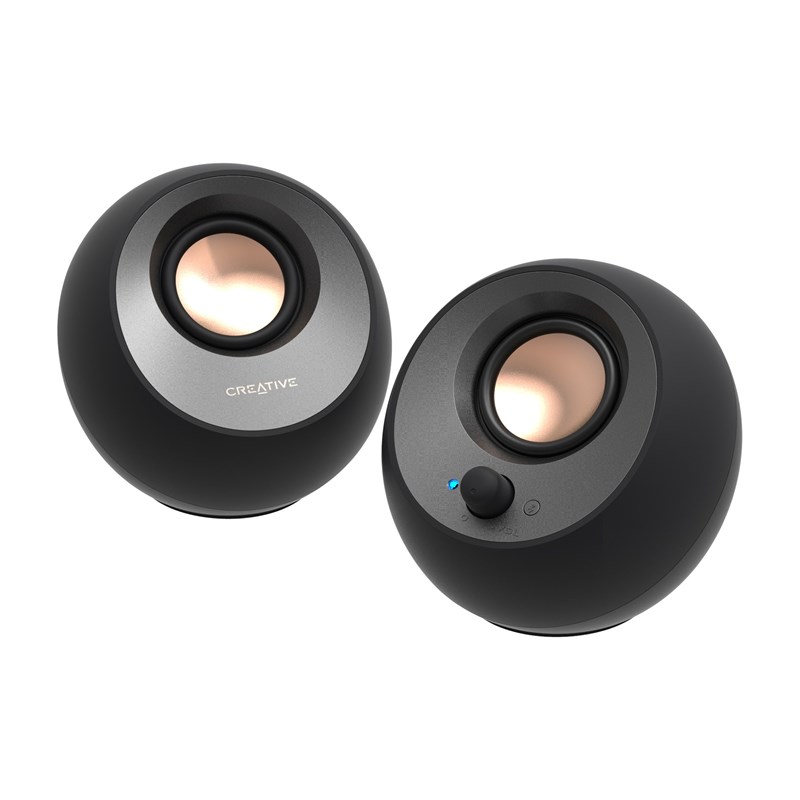
Comes in black and white; a higher-output USB-C power adapter is sold separately.
The Pebble V3 is the cheapest meaningful step up from laptop or monitor speakers. The 2.25-inch drivers are angled upward at 45 degrees toward the listener, the pair runs from a single USB-C cable, and it accepts USB audio, Bluetooth 5.0 and a 3.5mm input. It suits students, small desks and office use. Owners note that bass is light, as expected at this size, and that maximum volume depends on the power supply: a higher-output USB-C adapter lets it play louder than a computer's USB port.
Pros
- ✓Very low price
- ✓Single USB-C cable for power and audio
- ✓Bluetooth and 3.5mm inputs too
Cons
- ✗Light bass
- ✗Louder only with a stronger USB-C adapter
Subscribe to our newsletter
Occasional updates and new releases — no spam.

Offered in black and white, and in bundles with desktop stands or isolation pads.
The MR4 is a pair of entry-level studio monitors that doubles as a desk speaker. It has 4-inch woofers, 1-inch silk dome tweeters and 42W RMS in total, with balanced TRS, RCA and AUX inputs and a headphone jack on the front. A switch changes between a flatter Monitor mode for editing and a livelier Music mode. It suits podcasters, video editors and beginner producers who use an audio interface. The trade-offs are no Bluetooth, no USB and no remote.
Pros
- ✓Flatter Monitor mode for editing
- ✓Balanced TRS inputs for an audio interface
- ✓Front headphone output
Cons
- ✗No Bluetooth or USB
- ✗No remote control
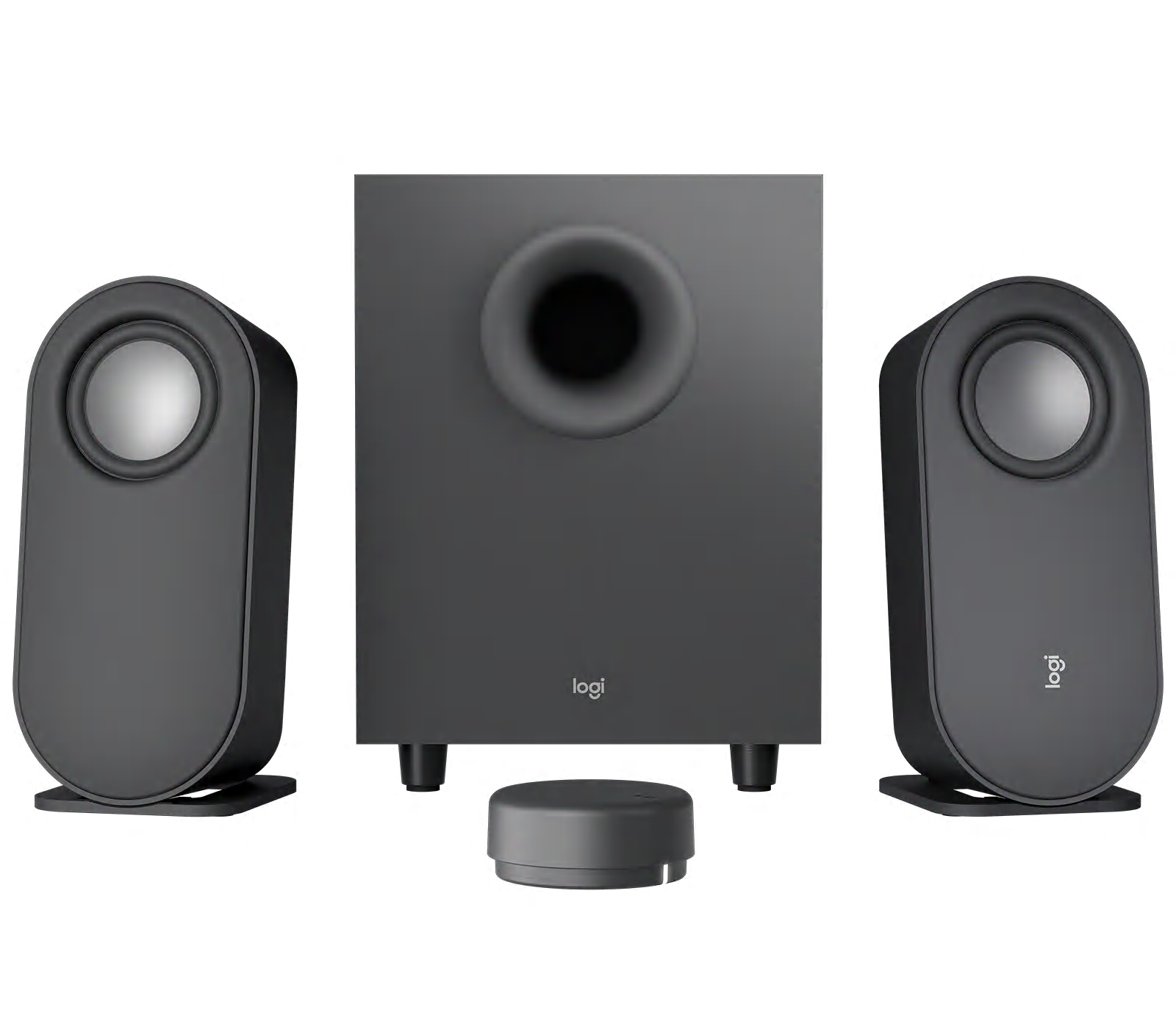
Sold in graphite; check that the listing is the Z407 with the wireless control puck.
The Z407 is the choice when bass impact matters more than accuracy. It is a 2.1 system rated at 80W peak (40W RMS), with a wired subwoofer that sits under the desk, two slim satellites that stand upright or lie flat, and a wireless control puck for volume and source. It takes Bluetooth, USB and 3.5mm inputs. It suits gamers and film watchers on a budget. Owners mention that the satellites sound thin on their own, so the sound depends on the subwoofer, and that the control puck runs on a coin-cell battery.
Pros
- ✓Separate subwoofer for real low end
- ✓Wireless control puck
- ✓Bluetooth, USB and 3.5mm inputs
Cons
- ✗Satellites sound thin alone
- ✗Subwoofer needs floor space
Size first: how much desk the speakers can take
The single biggest factor in how a desktop speaker sounds is how big its woofer and cabinet are, and the biggest limit on that is your desk. The Creative Pebble V3 uses 2.25-inch drivers in small spheres that fit beside a laptop; the Kanto ORA uses 3-inch woofers in a cabinet about 18 cm tall; the Edifier R1280DBs and MR4 are proper bookshelf-size boxes with 4-inch woofers that need roughly 15 cm of width each and some depth behind the monitor.
Measure before buying. A pair that has to be pushed into a corner or tucked under a monitor shelf loses the stereo image that makes larger speakers worth having. If your desk only fits small speakers, a compact pair placed well will sound better than a big pair squeezed in.
Inputs decide whether you will actually use them
Check what your computer and other sources can output before looking at sound. USB audio (Creative Pebble V3, Kanto ORA, Logitech Z407) bypasses a noisy headphone jack and is the simplest option for a laptop. Optical and coaxial inputs (Edifier R1280DBs) are useful if a TV or console will share the speakers. Balanced TRS inputs (Edifier MR4) matter only if you use an audio interface.
Bluetooth is convenient for a phone but adds a small delay that you may notice in games and videos, so wire the computer and keep Bluetooth for the phone. Models with two or more inputs let you leave both connected and switch with a button or remote instead of re-plugging cables.
Bass: a subwoofer, a bigger woofer, or neither
Small speakers cannot move enough air for deep bass, and no setting fixes that. If you mostly watch films or play games and want impact, a 2.1 system such as the Logitech Z407 puts the bass in a separate box under the desk. If you mainly listen to music at moderate volume, a good pair of 4-inch bookshelf speakers produces enough bass for most people without the extra box.
The Edifier R1280DBs and Kanto ORA both have a subwoofer output, so you can start with the pair and add a sub later. That is often a better path than buying a cheaper 2.1 kit up front, because the main speakers are what you hear most.
Common mistakes: placement, hiss and auto-standby
Most disappointing desktop speakers are placed badly rather than badly made. Keep the tweeters roughly at ear height, angle them toward your head, and leave a little space between the back of the cabinet and the wall. Speakers lying flat on a desk, pointing at your chest, lose clarity; cheap foam or rubber pads that tilt them up help noticeably.
Two complaints recur across brands in owner reviews. One is a faint hiss when nothing is playing, which is audible at close range on many powered speakers and more often through a laptop's headphone jack than through USB or optical. The other is auto-standby: some speakers switch off after a period of silence and take a moment to wake, which can clip the start of notification sounds. Neither is a defect, but both are worth knowing before you buy.
Frequently asked questions
Are powered bookshelf speakers better than dedicated PC speakers?▼
Do I need a subwoofer for a desk setup?▼
Is Bluetooth good enough for computer speakers?▼
Why do my speakers hiss when nothing is playing?▼
Prices change. Check the retailer for the current price.
Comments & questions
Discussion happens on nattzy, our community forum. Sign in with Google to post — it takes a second.
Still deciding? Ask the community your own question — Post a question on nattzy ↗
Related articles

Best Smart Watch 2026: 5 Fitness & Lifestyle Watches

Best Tablet Stand 2026: 5 Compared

Best LED Face Masks 2026: 3 Light Therapy Devices Compared
Best Robot Vacuums 2026: 5 Models Compared Honestly
Best Hair Dryers 2026: 5 high-end models compared honestly
Food
Best Rice Cookers 2026: 5 Top Models Compared
Best Rice Cookers 2026: 5 Top Models Compared